> For the complete documentation index, see [llms.txt](https://chatlyst.gitbook.io/chatlyst-user-guide/llms.txt). Markdown versions of documentation pages are available by appending `.md` to page URLs; this page is available as [Markdown](https://chatlyst.gitbook.io/chatlyst-user-guide/inbound-channels/facebook-messenger.md).

# Facebook Messenger

This guide shows how to manage the Facebook Messenger channel.

<div data-with-frame="true"><figure><img src="https://1646628841-files.gitbook.io/~/files/v0/b/gitbook-x-prod.appspot.com/o/spaces%2FBW7n4ClAhZvbgvusylCd%2Fuploads%2FZrUcBfErM0JDcUyarq4i%2Fimage.png?alt=media&amp;token=cc89bc2e-f0bb-41c5-9813-78ded0df85a8" alt="" width="375"><figcaption></figcaption></figure></div>

## Important Notes:

#### **Prerequisite for Connection**

Before connecting a Facebook Messenger to Chatlyst, one specific requirement must be completed within the Meta platform.

* **Add to Meta Business Suite:** The Facebook Page must be added to an active Meta Business Suite account.

#### Facebook Messenger 3-Way Synchronisation

If you registered using the Facebook Messenger, you will retain full access to the application. Messages are synchronized across both Chatlyst ([Chat](/chatlyst-user-guide/chat/chat.md) section) and the Facebook Messenger.

<details>

<summary><strong>Incoming customer messages</strong></summary>

<div><figure><img src="https://1646628841-files.gitbook.io/~/files/v0/b/gitbook-x-prod.appspot.com/o/spaces%2FBW7n4ClAhZvbgvusylCd%2Fuploads%2F2KmSCdlW3SevJtIwKpF3%2Fimage.png?alt=media&amp;token=78eb630b-f9ad-4277-91b5-07768eb947aa" alt=""><figcaption><p><strong>Chatlyst</strong></p></figcaption></figure> <figure><img src="https://1646628841-files.gitbook.io/~/files/v0/b/gitbook-x-prod.appspot.com/o/spaces%2FBW7n4ClAhZvbgvusylCd%2Fuploads%2FF3GNpSbfA2MRQWew1of0%2Fimage.png?alt=media&amp;token=18b45fa1-9de3-4091-b0dd-7d4ffefebe9d" alt=""><figcaption><p><strong>Facebook Messenger</strong></p></figcaption></figure></div>

</details>

<details>

<summary><strong>Bot-generated replies</strong></summary>

<div><figure><img src="https://1646628841-files.gitbook.io/~/files/v0/b/gitbook-x-prod.appspot.com/o/spaces%2FBW7n4ClAhZvbgvusylCd%2Fuploads%2Fz9qMODqVmubZ0UChD5xA%2Fimage.png?alt=media&amp;token=f3d4339d-9745-4a8f-8264-8e69e949565f" alt=""><figcaption><p><strong>Chatlyst</strong></p></figcaption></figure> <figure><img src="https://1646628841-files.gitbook.io/~/files/v0/b/gitbook-x-prod.appspot.com/o/spaces%2FBW7n4ClAhZvbgvusylCd%2Fuploads%2FVAtTDgWLNqRNeZ425yWK%2Fimage.png?alt=media&amp;token=b27c4335-9fcf-44c5-8597-32df46d744b9" alt=""><figcaption><p><strong>Facebook Messenger</strong></p></figcaption></figure></div>

</details>

<details>

<summary><strong>Live agent replies</strong></summary>

<div><figure><img src="https://1646628841-files.gitbook.io/~/files/v0/b/gitbook-x-prod.appspot.com/o/spaces%2FBW7n4ClAhZvbgvusylCd%2Fuploads%2F6O7DcUV8aL4vLkz6kc02%2Fimage.png?alt=media&amp;token=9b4bea7e-7396-48b1-93d9-f648b1e871e6" alt=""><figcaption><p><strong>Chatlyst</strong></p></figcaption></figure> <figure><img src="https://1646628841-files.gitbook.io/~/files/v0/b/gitbook-x-prod.appspot.com/o/spaces%2FBW7n4ClAhZvbgvusylCd%2Fuploads%2FoMj3y0fgekvzM7XOWB4I%2Fimage.png?alt=media&amp;token=d6a17d06-93ee-464a-93b4-6707c3c8b92e" alt=""><figcaption><p><strong>Facebook Messenger</strong></p></figcaption></figure></div>

</details>

#### **Message History**

Chatlyst does not sync historical messages from the Facebook Messenger. Only messages within active Chatlyst sessions will be visible in the platform.

***

## Manage Widgets

### **Widget On/Off**

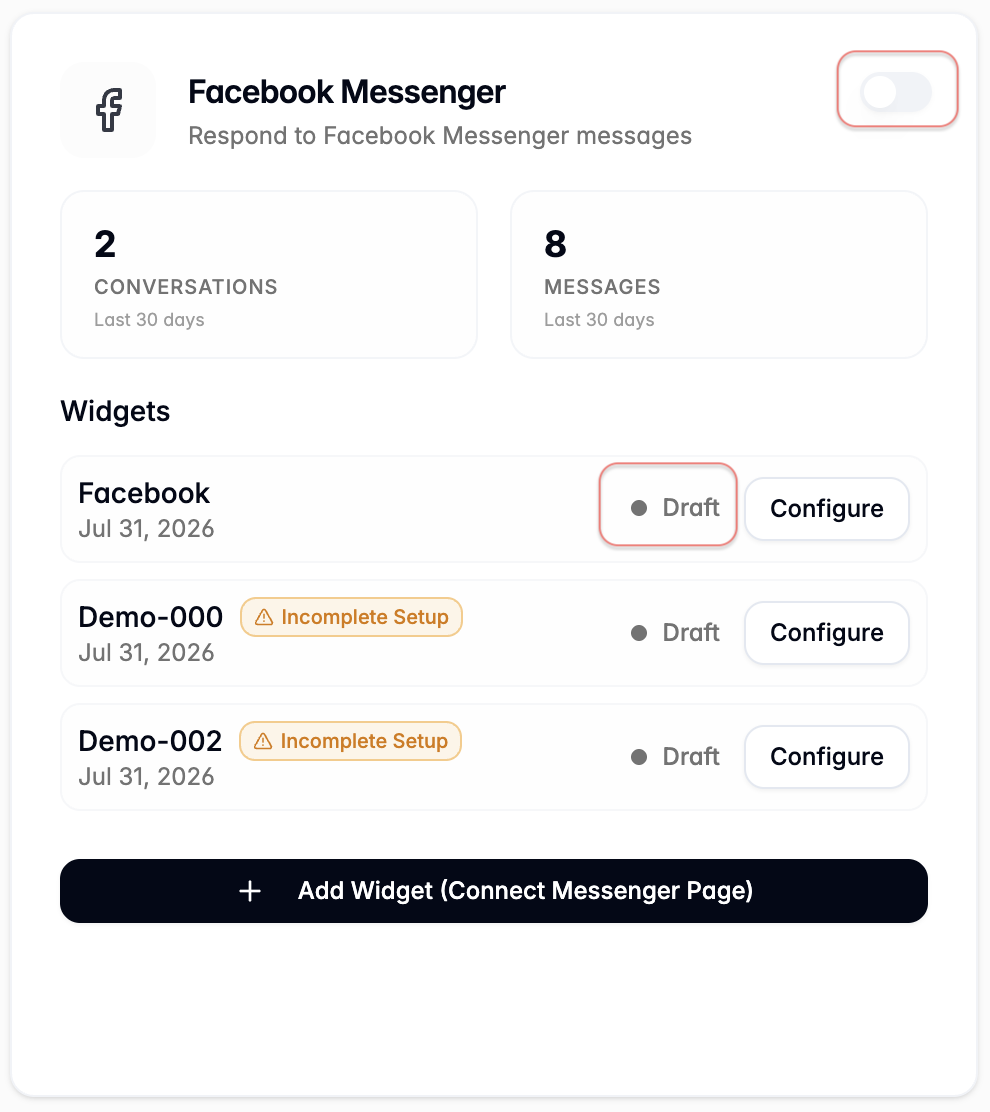
Use the switch in the top-right corner to turn a channel on or off.

When a channel is turned off, it is disabled immediately, and the chatbot stops appearing on that channel.

Any widgets connected to the channel automatically change from **Active** to **Draft**. This removes them from the live experience until the channel is enabled again.

<div><figure><img src="https://1646628841-files.gitbook.io/~/files/v0/b/gitbook-x-prod.appspot.com/o/spaces%2FBW7n4ClAhZvbgvusylCd%2Fuploads%2F3CfUZsNdyFIQvqJ6tRPi%2Fimage.png?alt=media&amp;token=8ea7e454-42a3-4a5b-aeea-7823a0cf4439" alt=""><figcaption></figcaption></figure> <figure><img src="https://1646628841-files.gitbook.io/~/files/v0/b/gitbook-x-prod.appspot.com/o/spaces%2FBW7n4ClAhZvbgvusylCd%2Fuploads%2FULazTD7K6HEUrEH8LWjT%2Fimage.png?alt=media&amp;token=6cc67015-100b-4d32-8c2d-679d0eb4e5f6" alt=""><figcaption></figcaption></figure></div>

### **Recent Metrics**

The tab shows the number of conversations and messages from the past 30 days. Use these metrics to confirm the channel is receiving traffic and validate performance before making configuration updates.

<div data-with-frame="true"><figure><img src="https://1646628841-files.gitbook.io/~/files/v0/b/gitbook-x-prod.appspot.com/o/spaces%2FBW7n4ClAhZvbgvusylCd%2Fuploads%2F4sNSPffYF4jqAxBZSWy4%2Fimage.png?alt=media&amp;token=24455f6f-3a10-44f6-bb91-46465aa05994" alt="" width="375"><figcaption></figcaption></figure></div>

### **Add and Configure Widget**

To add a widget, select **Add Widget (Connect Messenger Page)** to launch the widget setup flow. For additional context, follow [Add a Widget](/chatlyst-user-guide/inbound-channels/facebook-messenger/add-a-widget.md).

1. The guided setup walks through:
   * Entering the widget’s key details.
   * Reviewing the default settings.

<div data-with-frame="true"><figure><img src="https://1646628841-files.gitbook.io/~/files/v0/b/gitbook-x-prod.appspot.com/o/spaces%2FBW7n4ClAhZvbgvusylCd%2Fuploads%2Fy6065nSbQCfTWScAXat1%2Fimage.png?alt=media&amp;token=60b2c886-3101-402c-a78f-beda29a38d7a" alt="" width="375"><figcaption></figcaption></figure></div>

2. To configure a widget, select the widget from the list, then select **Configure** to open the widget setup and review its configuration. For additional context, follow [Configure a Widget](/chatlyst-user-guide/inbound-channels/facebook-messenger/configure-a-widget.md).

<div data-with-frame="true"><figure><img src="https://1646628841-files.gitbook.io/~/files/v0/b/gitbook-x-prod.appspot.com/o/spaces%2FBW7n4ClAhZvbgvusylCd%2Fuploads%2FKpqefnCyjvzLAbEhrYfD%2Fimage.png?alt=media&amp;token=374e3184-e32a-4fc8-9138-332951f2b458" alt="" width="375"><figcaption></figcaption></figure></div>

{% hint style="warning" %}
**Important Note**: All widgets share the same Business Knowledge base. This means updates to your Business Knowledge apply to every widget, so users do not need to maintain separate knowledge for each one.
{% endhint %}