> For the complete documentation index, see [llms.txt](https://chatlyst.gitbook.io/chatlyst-user-guide/llms.txt). Markdown versions of documentation pages are available by appending `.md` to page URLs; this page is available as [Markdown](https://chatlyst.gitbook.io/chatlyst-user-guide/customers/customer-list.md).

# Customer List

### Search Customer

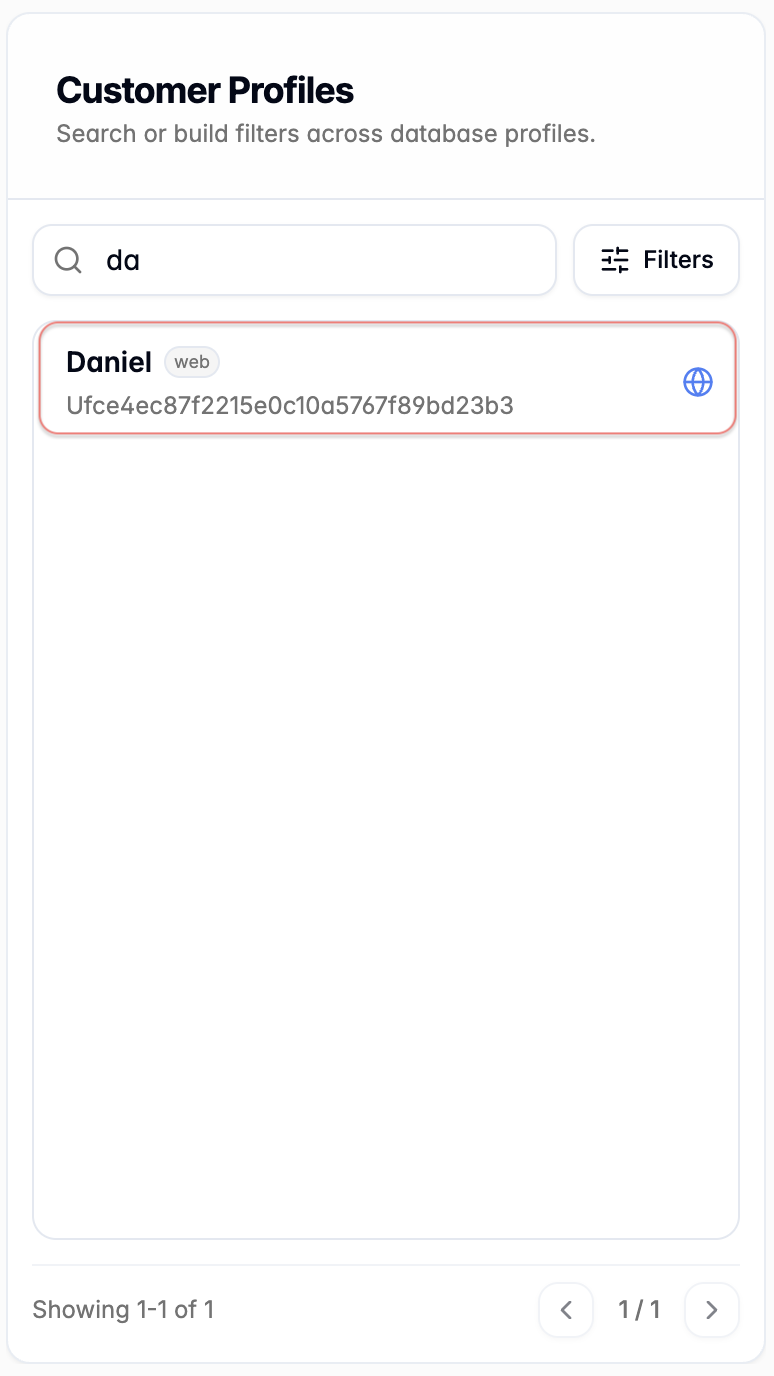
Use the search bar to find customers quickly. As text is entered, the customer list updates automatically, and a customer can be selected to review details in the right panel.

<div><figure><img src="https://1646628841-files.gitbook.io/~/files/v0/b/gitbook-x-prod.appspot.com/o/spaces%2FBW7n4ClAhZvbgvusylCd%2Fuploads%2FWr2b5J6BTLayzMWMkkg0%2Fimage.png?alt=media&amp;token=43899f14-8adc-4e99-8c51-14b9527fd0f9" alt=""><figcaption></figcaption></figure> <figure><img src="https://1646628841-files.gitbook.io/~/files/v0/b/gitbook-x-prod.appspot.com/o/spaces%2FBW7n4ClAhZvbgvusylCd%2Fuploads%2FhEMR8Am8TprEMM1lBLFw%2Fimage.png?alt=media&amp;token=ee471f7e-e7f7-4959-b7f2-c9d2321e080b" alt=""><figcaption></figcaption></figure></div>

***

### Filters

Use structured filters to narrow the customer list.&#x20;

<div data-with-frame="true"><figure><img src="https://1646628841-files.gitbook.io/~/files/v0/b/gitbook-x-prod.appspot.com/o/spaces%2FBW7n4ClAhZvbgvusylCd%2Fuploads%2FWob6rIKImJIdBaRTZ8nP%2Fimage.png?alt=media&amp;token=c28ffa5b-1432-4073-9473-08aab9b6e9fa" alt="" width="375"><figcaption></figcaption></figure></div>

{% stepper %}
{% step %}
**Primary Fields**

Search by customer name, email, or phone number.

<div data-with-frame="true"><figure><img src="https://1646628841-files.gitbook.io/~/files/v0/b/gitbook-x-prod.appspot.com/o/spaces%2FBW7n4ClAhZvbgvusylCd%2Fuploads%2F45FHQoZRCaE90lqmbTj6%2Fimage.png?alt=media&amp;token=1f52a7e4-dd14-457e-b8a4-f9a4ee758d8f" alt="" width="375"><figcaption></figcaption></figure></div>
{% endstep %}

{% step %}
**Custom Attributes Search**

Use custom attribute to narrow the search. All system attributes and custom attributes are available as searchable fields.

<div data-with-frame="true"><figure><img src="https://1646628841-files.gitbook.io/~/files/v0/b/gitbook-x-prod.appspot.com/o/spaces%2FBW7n4ClAhZvbgvusylCd%2Fuploads%2FeohUZ4fkVlJ5mmJecGlD%2Fimage.png?alt=media&amp;token=19712505-4da4-4f63-9de5-79f6acfddaa3" alt="" width="375"><figcaption></figcaption></figure></div>
{% endstep %}

{% step %}
Select **+ Add field filter**.&#x20;

* For attribute setup, more information on [Customer Attributes](/chatlyst-user-guide/settings/customer-attributes.md).
* For multiple attributes search, more information on [Multiple Custom Attributes Search](#multiple-custom-attributes-search).

<div data-with-frame="true"><figure><img src="https://1646628841-files.gitbook.io/~/files/v0/b/gitbook-x-prod.appspot.com/o/spaces%2FBW7n4ClAhZvbgvusylCd%2Fuploads%2FiqF1jkNy93iJXEcDnIF4%2Fimage.png?alt=media&amp;token=e2c1ce1c-5ed8-4f7a-b769-502b8a105f8d" alt="" width="375"><figcaption></figcaption></figure></div>
{% endstep %}

{% step %}
Select an attribute from the dropdown list.&#x20;

* In this example, **age (number)** and **gender (string)** are custom attributes, and **Initial Inbound Channel (string)**, **Country (string)** and **Browser (string)** are system attributes.

<div data-with-frame="true"><figure><img src="https://1646628841-files.gitbook.io/~/files/v0/b/gitbook-x-prod.appspot.com/o/spaces%2FBW7n4ClAhZvbgvusylCd%2Fuploads%2FbcQHQqDOZdV8qvj79d4A%2Fimage.png?alt=media&amp;token=e86c0991-e95c-4212-b289-0fee380c7461" alt="" width="375"><figcaption></figcaption></figure></div>
{% endstep %}

{% step %}
Select the [operator](/chatlyst-user-guide/customers/customer-list.md#attribute-operators) and enter the value. Select **Search** to apply the filter. (or select **Clear Local Fields** to reset the current filters and start a new search.)

<div data-with-frame="true"><figure><img src="https://1646628841-files.gitbook.io/~/files/v0/b/gitbook-x-prod.appspot.com/o/spaces%2FBW7n4ClAhZvbgvusylCd%2Fuploads%2Ff4L9DJQ4YhTSNXkepHtH%2Fimage.png?alt=media&amp;token=7ebb2676-56b4-4a08-b37b-df84f95e4cd2" alt="" width="375"><figcaption></figcaption></figure></div>
{% endstep %}

{% step %}
The search results appear below the search bar based on the filters you applied.

<div data-with-frame="true"><figure><img src="https://1646628841-files.gitbook.io/~/files/v0/b/gitbook-x-prod.appspot.com/o/spaces%2FBW7n4ClAhZvbgvusylCd%2Fuploads%2FBtts2g0MKPcdPwQQYbkK%2Fimage.png?alt=media&amp;token=3ccb9312-0e1b-4895-9cc1-ffa5c945bec2" alt="" width="375"><figcaption></figcaption></figure></div>
{% endstep %}
{% endstepper %}

***

### Multiple Custom Attributes Search

You can add more than one custom attribute filter. Each added filter is combined, so the customer list only shows profiles that match all selected filters.

For example, if a search includes **Custom Attribute A** and **Custom Attribute B**, Chatlyst returns customers who match **A and B**.&#x20;

In the example shown, the filters are age greater than 28 and gender equal M, so the results only include customers who meet both of these conditions.

<div data-with-frame="true"><figure><img src="https://1646628841-files.gitbook.io/~/files/v0/b/gitbook-x-prod.appspot.com/o/spaces%2FBW7n4ClAhZvbgvusylCd%2Fuploads%2F9hT8AHkpxFZc3rD7Cqxg%2Fimage.png?alt=media&amp;token=35945f2b-2438-4198-87c4-997693299346" alt="" width="563"><figcaption></figcaption></figure></div>

#### Attribute Operators

If the attribute type is **Number**, the following operators are available:

* Equal
* Not Equal
* Greater Than
* Greater or Equal
* Less Than
* Less or Equal
* Range (Between)

If the attribute type is **String (Text)**, the following operators are available:

* Equal
* Not Equal