> For the complete documentation index, see [llms.txt](https://chatlyst.gitbook.io/chatlyst-user-guide/llms.txt). Markdown versions of documentation pages are available by appending `.md` to page URLs; this page is available as [Markdown](https://chatlyst.gitbook.io/chatlyst-user-guide/chat/customer-details.md).

# Customer Details

### Viewing Customer Details

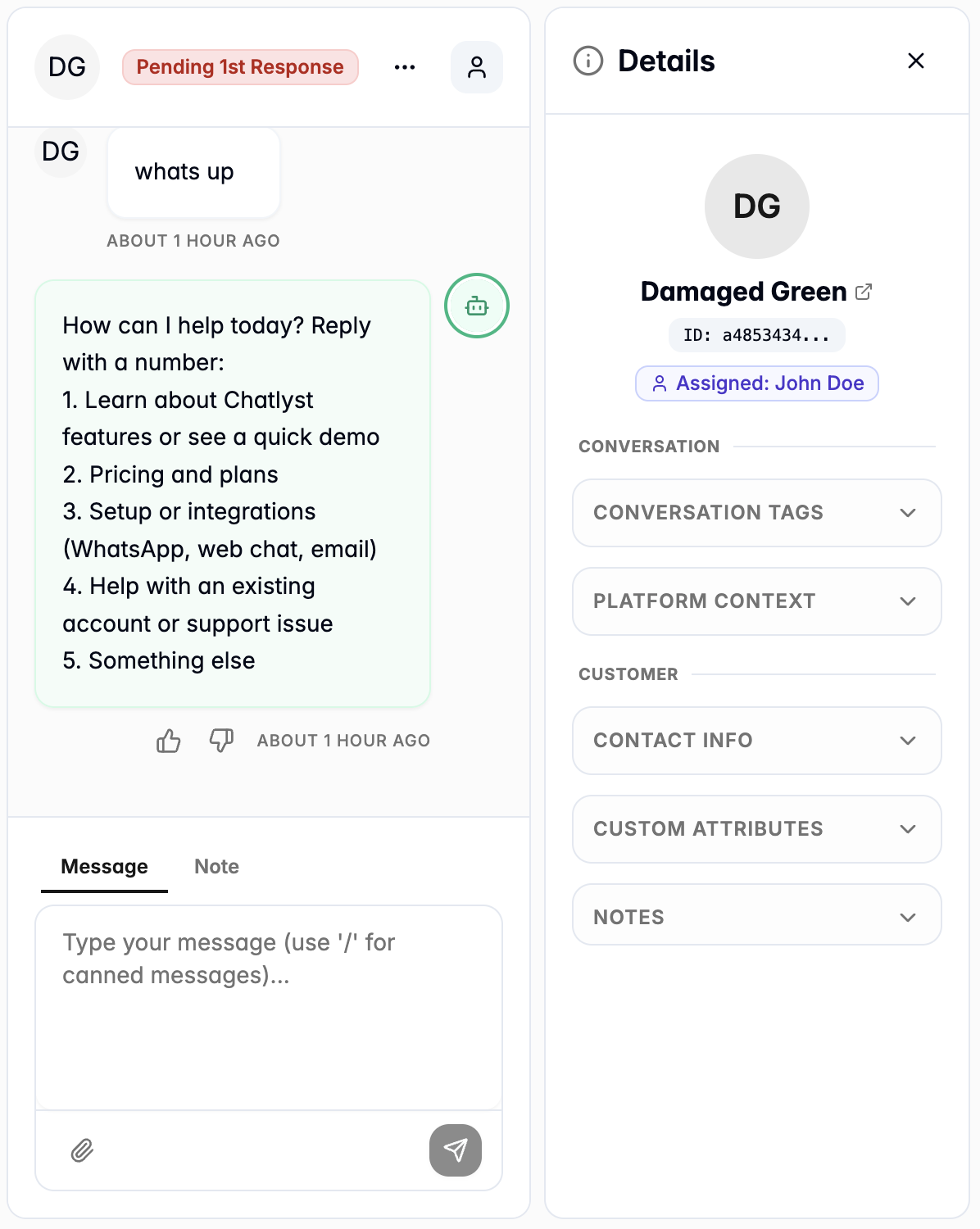
To access information about a customer, select the **person** icon located in the Conversation Panel to open the Customer Details view.&#x20;

<div><figure><img src="https://1646628841-files.gitbook.io/~/files/v0/b/gitbook-x-prod.appspot.com/o/spaces%2FBW7n4ClAhZvbgvusylCd%2Fuploads%2FG2ZftBvQwMBNtJKsMf3q%2Fimage.png?alt=media&amp;token=4c736f26-a0c2-4c14-9da5-f62a78c04b07" alt=""><figcaption></figcaption></figure> <figure><img src="https://1646628841-files.gitbook.io/~/files/v0/b/gitbook-x-prod.appspot.com/o/spaces%2FBW7n4ClAhZvbgvusylCd%2Fuploads%2FXDFwKCrWOiecX60kfdQe%2Fimage.png?alt=media&amp;token=ed848672-2121-48af-b3dd-50f65efddc5c" alt=""><figcaption></figcaption></figure></div>

***

### Profile Information

This section displays basic identifying details about the customer and the team member currently assisting them.

#### Customer Name and ID

Displays the customer's identity. Select the customer's name to navigate to the main [Customers](/chatlyst-user-guide/customers/customers.md) page and review their complete profile.

<div><figure><img src="https://1646628841-files.gitbook.io/~/files/v0/b/gitbook-x-prod.appspot.com/o/spaces%2FBW7n4ClAhZvbgvusylCd%2Fuploads%2FCmO1itc9jTjOFd6s6TK3%2Fimage.png?alt=media&amp;token=62357d90-c45c-47cf-af3d-90e345366f71" alt="" width="402"><figcaption></figcaption></figure> <figure><img src="https://1646628841-files.gitbook.io/~/files/v0/b/gitbook-x-prod.appspot.com/o/spaces%2FBW7n4ClAhZvbgvusylCd%2Fuploads%2FoxlEOblchxFmeRt4YZ0z%2Fimage.png?alt=media&amp;token=7547e9f9-a02f-4ecb-b3bc-ef73c9db77eb" alt=""><figcaption></figcaption></figure></div>

#### Current Assignee

Displays the specific team member currently assigned to manage the conversation.

<div data-with-frame="true"><figure><img src="https://1646628841-files.gitbook.io/~/files/v0/b/gitbook-x-prod.appspot.com/o/spaces%2FBW7n4ClAhZvbgvusylCd%2Fuploads%2FE0l2k6oWGaJqd4jBs0Jg%2Fimage.png?alt=media&amp;token=2c84b1d0-f7ed-4637-ad81-b9d3117e6be5" alt="" width="402"><figcaption></figcaption></figure></div>

#### Conversation Context and Customer Information

The [Conversation Context](#conversation-context) and [Customer Information](#customer-information) sections display detailed information about the active chat session and the customer's profile.&#x20;

To view or edit these details, simply select any specific item within either section to expand it, review the full information, and apply any necessary changes. Please refer to the following guide for more detailed instructions.

<div data-with-frame="true"><figure><img src="https://1646628841-files.gitbook.io/~/files/v0/b/gitbook-x-prod.appspot.com/o/spaces%2FBW7n4ClAhZvbgvusylCd%2Fuploads%2FKu2btLoOpHP8D2rarXh6%2Fimage.png?alt=media&amp;token=3f614fda-d7d3-45e1-9951-ddd1c3595b06" alt="" width="384"><figcaption></figcaption></figure></div>

***

### Conversation Context

This section provides technical data and routing information regarding the active chat session.

#### Conversations Tags

Displays any tags currently applied to categorize the active chat. Please refer [Conversations Tags](/chatlyst-user-guide/settings/conversation-tags.md) guide for more details.

<div data-with-frame="true"><figure><img src="https://1646628841-files.gitbook.io/~/files/v0/b/gitbook-x-prod.appspot.com/o/spaces%2FBW7n4ClAhZvbgvusylCd%2Fuploads%2Fmqtjo3IiftY9UoPj7phL%2Fimage.png?alt=media&amp;token=22ffdf5d-c00b-49f7-b69f-fb3e0840d93e" alt="" width="351"><figcaption></figcaption></figure></div>

* To add a tag, select **Add Tag** and choose the desired tag from the list to apply it to the conversation.&#x20;

<div data-with-frame="true"><figure><img src="https://1646628841-files.gitbook.io/~/files/v0/b/gitbook-x-prod.appspot.com/o/spaces%2FBW7n4ClAhZvbgvusylCd%2Fuploads%2FTOH3PddQEyi9QCbZOrte%2Fimage.png?alt=media&amp;token=6c5597f1-0021-4bb8-9d45-67176ffeba1c" alt="" width="348"><figcaption></figcaption></figure></div>

* To remove a tag, locate the active tag you want to remove, select the **cross** icon next to the tag name to delete it from the chat.

<div data-with-frame="true"><figure><img src="https://1646628841-files.gitbook.io/~/files/v0/b/gitbook-x-prod.appspot.com/o/spaces%2FBW7n4ClAhZvbgvusylCd%2Fuploads%2F9JFke2veqsj5e9lyTOHu%2Fimage.png?alt=media&amp;token=1370bb67-70d8-4754-9d20-c1f6aee3bd19" alt="" width="351"><figcaption></figcaption></figure></div>

#### Platform Context

<div data-with-frame="true"><figure><img src="https://1646628841-files.gitbook.io/~/files/v0/b/gitbook-x-prod.appspot.com/o/spaces%2FBW7n4ClAhZvbgvusylCd%2Fuploads%2FHLbpdfTKbHNJiUD7FiQT%2Fimage.png?alt=media&amp;token=ed108f45-2146-4be1-9bdf-88767c8a8716" alt="" width="354"><figcaption></figcaption></figure></div>

**Source**: Indicates the exact entry point or campaign the customer clicked to start the conversation.

**Channel**: Displays the messaging platform used, such as a Website widget, LINE, or WhatsApp. This indicates where replies will appear and what channel features are supported.

**Language**: Displays the detected or preferred language of the customer (for example, EN for English).

**User Agent**: Identifies the customer’s internet browser or application environment. This data is highly useful for troubleshooting technical issues.

**Referrer**: Indicates the specific chat widget or starting point the customer used to initiate contact.

**Session ID**: A unique system code identifying the current interaction. Select the **copy** icon next to the value to duplicate this ID for tracking or debugging purposes.

**First Active**: Displays the exact timestamp when the customer initially engaged, helping the team understand the total length of the interaction.

***

### Customer Information

This section contains contact data, specific account variables, and internal team memos.

#### Contact Info

Displays key contact methods, such as an email address and phone number, if provided by the customer.

<div data-with-frame="true"><figure><img src="https://1646628841-files.gitbook.io/~/files/v0/b/gitbook-x-prod.appspot.com/o/spaces%2FBW7n4ClAhZvbgvusylCd%2Fuploads%2FgVpfncri6QM7T8GgdiTr%2Fimage.png?alt=media&amp;token=a6ba9e8f-e67b-4093-af7a-b374a867059a" alt="" width="366"><figcaption></figcaption></figure></div>

#### Custom Attributes

Displays specific, customized fields configured for this customer, such as account tier, region, or user segment. These attributes are predefined in the system Settings. Refer to the [Edit Customer Profile](/chatlyst-user-guide/customers/customer-panel.md#edit-customer-profile) guide for more details.

<div data-with-frame="true"><figure><img src="https://1646628841-files.gitbook.io/~/files/v0/b/gitbook-x-prod.appspot.com/o/spaces%2FBW7n4ClAhZvbgvusylCd%2Fuploads%2FBCU0BIObNWYP7l6rXO9U%2Fimage.png?alt=media&amp;token=92dc6b3d-2539-427a-98d6-d16a663785a1" alt="" width="368"><figcaption></figcaption></figure></div>

#### Notes

A designated area to leave private, internal memos about the customer profile.&#x20;

* Type a message into the text field and select **Add Note** to save it for other team members to reference.

<div data-with-frame="true"><figure><img src="https://1646628841-files.gitbook.io/~/files/v0/b/gitbook-x-prod.appspot.com/o/spaces%2FBW7n4ClAhZvbgvusylCd%2Fuploads%2FuzgTxaw8gNIfqMjtX2qd%2Fimage.png?alt=media&amp;token=67df7f54-8c9f-4467-929d-6ade0cad1a68" alt="" width="366"><figcaption></figcaption></figure></div>
